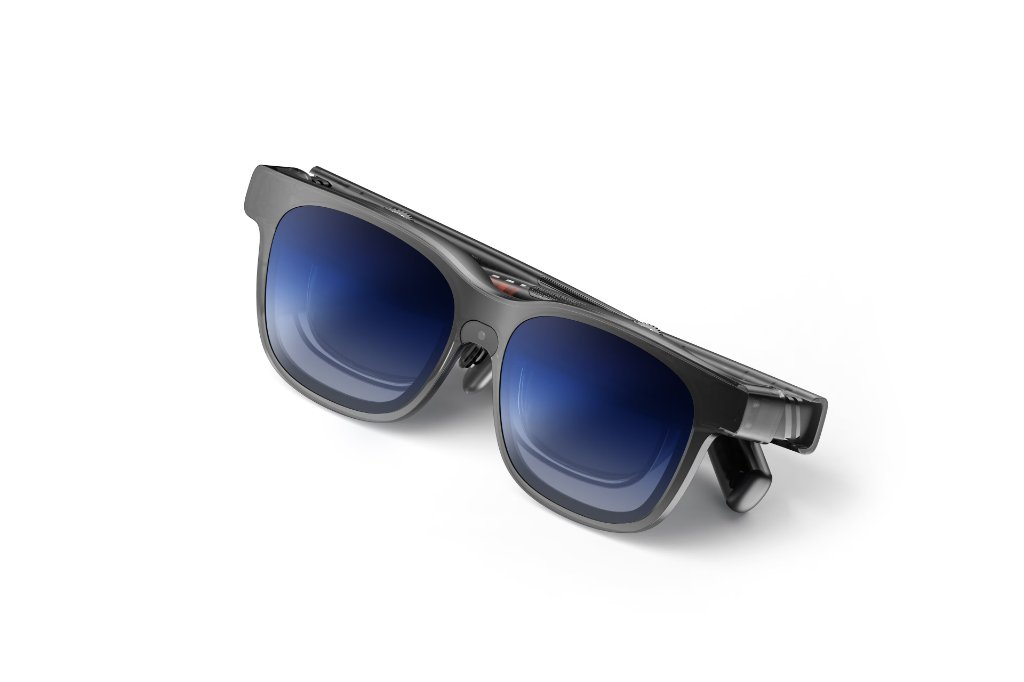
VITURE Luma Pro - view 1
VITURE
Editor's Pick

VITURE Luma Pro

Optometrist Perspective - UK Registered

Research-based review by Sean Higgins

A 1200p wearable display with a wider viewing field, electronic dimming and more limited myopia dials than standard Luma.

Prescription options — see assessment
AR Display
  • Reviewers praise picture sharpness
  • Electronic dimming
  • Regular and Large fitting options

Optical perspective · Published evidence and editorial interpretation

Sean’s optical assessment

By , GOC Registered Optometrist

My view

There is a good reason to consider the Luma Pro for films and games, but I would not automatically choose it over the standard Luma for every prescription wearer. The focus-adjustment range differs. Start with your correction and the part of the screen you can actually read, then decide whether the display upgrade is worth it.

Manufacturer evidence and independent test

The prescription trade-off

VITURE limits Pro’s myopia adjustment to −4.0D. Tom’s Guide reports that VITURE linked the reduction to maintaining peripheral image quality with the wider viewing field. It is a useful reminder that increasing a display’s field of view can introduce optical design trade-offs rather than an improvement in every respect.[1][2]

Independent test

Clarity is more than pixel count

Tom’s Guide praised sharpness and glare control; Android Authority also reported a vivid, clear picture. Those reports make Pro worth a fitting trial, but they do not verify your individual prescription or eye alignment. Small text across the entire display is a better test than a vivid central image.[2][3]

Optical interpretation

Size and optical position

VITURE offers Regular and Large versions and fitting adjustments. Confirm the current model’s supported pupil-distance guidance with the supplier, rather than choosing on head width alone. Nose-pad height and the distance from the optics to your eyes should be checked with any prescription insert installed.[4][3]

Optical interpretation

What I would check before recommending it

I would compare the standard screen-mirroring experience with your intended SpaceWalker or accessory workflow. A sharp panel does not guarantee stable virtual monitors in every app. For spectacle wearers, get explicit confirmation of cylinder and any prism requirements; the built-in dials are not a full prescription service.[5][1]

Optical pros & cons

A summary of the evidence and optical interpretation above.

Reasons to consider it

  • Reviewers praise picture sharpness
  • Electronic dimming
  • Regular and Large fitting options

Limitations to weigh up

  • Myopia adjustment limited to −4.0D
  • Astigmatism may still need inserts
  • Advanced workflows depend on software and accessories

Before choosing this pair

My fitting checklist

  1. Check the −4.0D limit against your prescription.
  2. Confirm Regular or Large fitting guidance.
  3. Test your real applications and insert together.

Who I would shortlist it for

A user who values the screen upgrade and fits the available optical configuration.

Where I would be cautious

Someone relying on the Pro dials alone to correct stronger myopia or astigmatism.

Technical Specifications

Connectivity

Compatible video source; workflow-specific accessories

Lenses

Myopia adjustment to −4.0D; Regular/Large options

Display

1200p wearable display; 52° field of view

Research sources

The sources used for this assessment are linked below. Review dates and the exact model matter: software can change, and one frame’s fit does not establish another’s. Manufacturer information supports specifications and lens options; independent reviews describe the named tester’s experience. The prescription and fitting advice is my optical interpretation.

  1. Manufacturer

    [1] VITURE support — model-specific dioptre limits
  2. Independent test

    [2] Tom’s Guide — Jason England, Luma Pro optical assessment
  3. Independent test

    [3] Android Authority — Oliver Cragg, Luma Pro review
  4. Manufacturer

    [4] VITURE — Luma series optical and fitting features
  5. Manufacturer

    [5] VITURE — Luma model and accessory distinctions
How the optical interpretation is formed

The fitting checklist is an editorial interpretation, not a report that this pair has been physically fitted to you. Relevant checks include the prescription, lens positioning, frame stability and intended task. ABDO’s visual-discomfort guidance explains these general dispensing considerations.

Blue-light filtering or display certification is not treated here as proof of symptom-free use. Cochrane’s review of blue-light filtering spectacle lenses found no established short-term advantage for computer-related visual fatigue. This evidence concerns spectacle filters, not a clinical test of this smart-glasses model.

Read our review methodology